
A lightweight and versatile PHP library for debugging and inspecting variables with customizable output formats.
 michelphp
7e820fea65
nitial release of PHP VarDumper
michelphp
7e820fea65
nitial release of PHP VarDumper
|
6 ヶ月 前 | |
|---|---|---|
| exemples | 6 ヶ月 前 | |
| functions | 6 ヶ月 前 | |
| resources | 6 ヶ月 前 | |
| screenshot | 6 ヶ月 前 | |
| src | 6 ヶ月 前 | |
| tests | 6 ヶ月 前 | |
| .gitignore | 6 ヶ月 前 | |
| LICENSE | 6 ヶ月 前 | |
| README.md | 6 ヶ月 前 | |
| composer.json | 6 ヶ月 前 |
README.md
Michel PHP VarDumper
A lightweight and versatile PHP library for debugging and inspecting variables with customizable output formats.
Installation
You can install this library via Composer. Ensure your project meets the minimum PHP version requirement of 7.4.
composer require michel/vardumper
Requirements
- PHP version 7.4 or higher
Usage
The library provides two main functions for debugging: dump() and dd(). These functions allow you to inspect variables in a readable format, with support for both CLI and HTML output.
dump() Function
The dump() function outputs the variable(s) passed to it without terminating the script. This is useful for inspecting variables during the execution of your code.
<?php

require 'vendor/autoload.php';

$data = [
    'name' => 'John Doe',
    'age' => 30,
    'email' => 'john.doe@example.com'
];

dump($data);
dd() Function
The dd() function (short for "dump and die") outputs the variable(s) passed to it and then terminates the script. This is useful for debugging and inspecting variables at a specific point in your code.
<?php

require 'vendor/autoload.php';

$data = [
    'name' => 'John Doe',
    'age' => 30,
    'email' => 'john.doe@example.com'
];

dd($data);
Output Formats
The library automatically detects the environment (CLI or web) and formats the output accordingly. You can also manually specify the output format if needed.
CLI Output
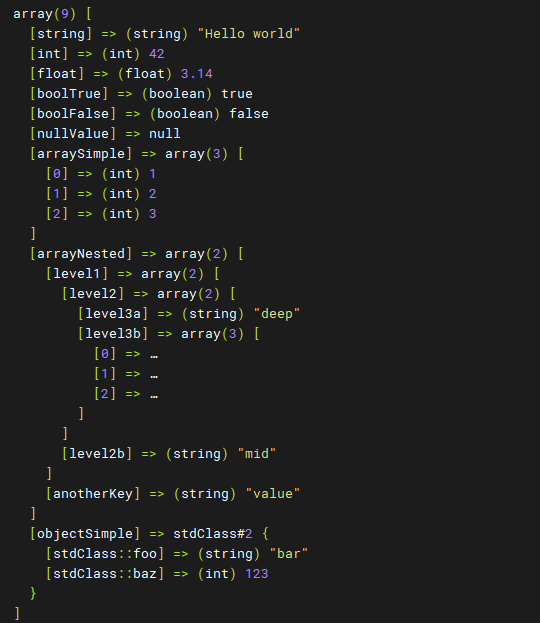
When running in a CLI environment, the output is formatted for readability in the terminal.
<?php

require 'vendor/autoload.php';

$data = [
    'name' => 'John Doe',
    'age' => 30,
    'email' => 'john.doe@example.com'
];

dump($data);
CLI Output Example:
array(3) [
  [name] => (string) "John Doe"
  [age] => (int) 30
  [email] => (string) "john.doe@example.com"
]
HTML Output
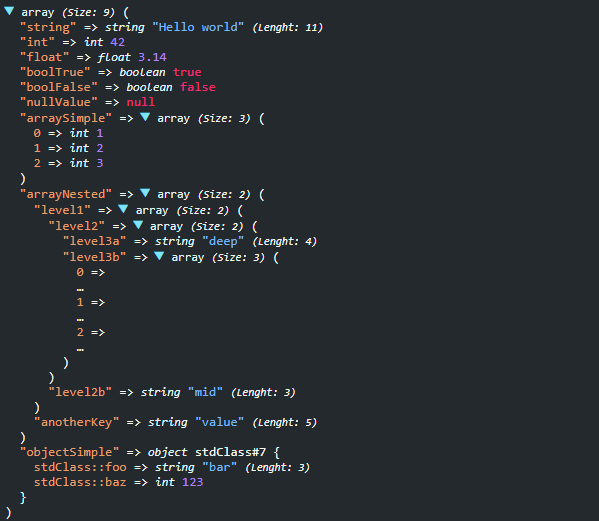
When running in a web environment, the output is formatted with HTML for better readability in the browser.
<?php

require 'vendor/autoload.php';

$data = [
    'name' => 'John Doe',
    'age' => 30,
    'email' => 'john.doe@example.com'
];

dump($data);
HTML Output Example:
<div id="var_dump_7426e40db5b46be3c13051ff19d2eff0" class="__beautify-var-dumper">
<span class="type caret caret-down" data-target="#target_0fa6bec56ef91af4269ff3ac1ec702e4">array</span>
<small><i>(Size: 3)</i></small> (
<br>
<div class="nested active" id="target_0fa6bec56ef91af4269ff3ac1ec702e4">
<span class="key">name</span> =>
<span class="string">
<span class="type">string</span> 'John Doe'
</span>
<small><i>(Lenght: 8)</i></small>
<br>
<span class="key">age</span> =>
<span class="number">
<span class="type">int</span> 30
</span>
<br>
<span class="key">email</span> =>
<span class="string">
<span class="type">string</span> 'john.doe@example.com'
</span>
<small><i>(Lenght: 20)</i></small>
<br>)
</div>
</div>
Custom Output
You can also customize the output by passing a custom OutputInterface implementation to the VarDumper constructor.
<?php

require 'vendor/autoload.php';

use Michel\Debug\VarDumper;
use Michel\Debug\Output\OutputInterface;

class CustomOutput implements OutputInterface
{
    public function print($data): void
    {
        // Custom output logic here
        echo "Custom Output: " . print_r($data, true);
    }
}

$data = [
    'name' => 'John Doe',
    'age' => 30,
    'email' => 'john.doe@example.com'
];

$varDumper = new VarDumper(new CustomOutput());
$varDumper->dump($data);
Screenshots
CLI Mode
HTML Mode
License
This library is open-source software licensed under the MIT license. See the LICENSE file for more information.